Dictate emails, notes and reports — without sending your voice to the cloud
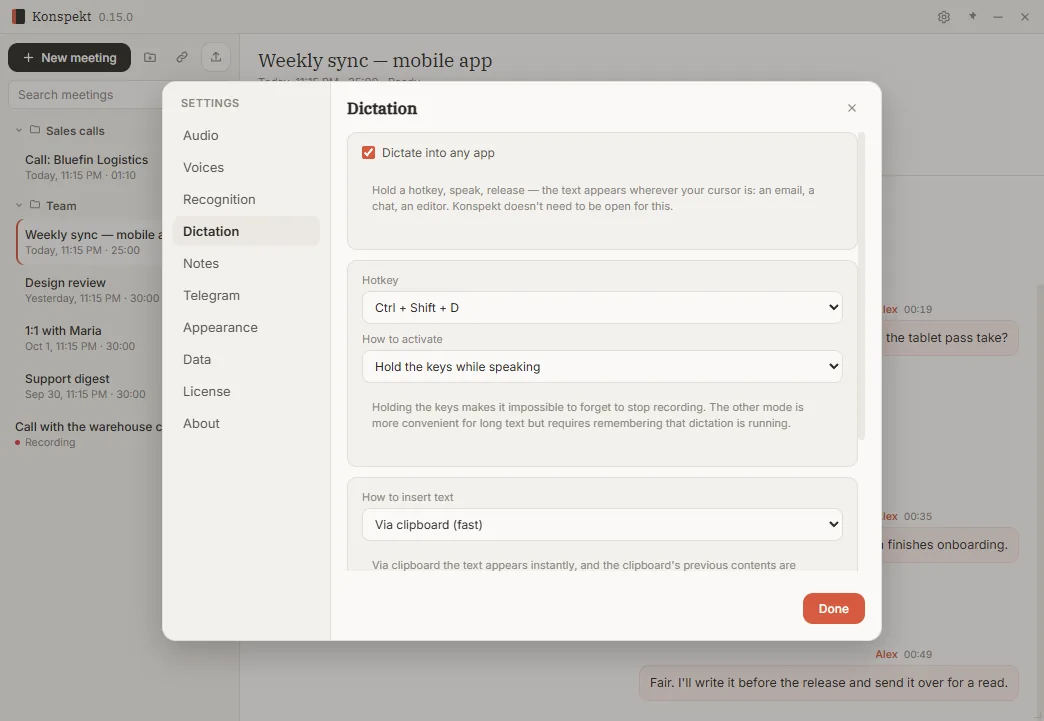
Hold Ctrl+Shift+D, speak, release: the text appears where your cursor is — an Outlook email, a CRM note after a client call, a report in Word. Recognition runs on your computer, so client names, numbers and details never leave it. Dictation is part of Konspekt and is free.
Download for WindowsWindows 10 and 11 · free · no sign-up · v0.18.1
0/75 antivirus engines on VirusTotal flagged the fileHow it works
- Install Konspekt. On first launch it downloads the speech models once, about 720 MB.
- Put the cursor where the text should go and hold Ctrl+Shift+D.
- Speak, then release: the text goes in with punctuation and capital letters.
Where it saves time at work
- Email. Dictate replies in Outlook or Gmail instead of typing them.
- Notes after a call. Speak the summary straight into your CRM — Salesforce, HubSpot, Zoho or any CRM in the browser.
- Documents and reports. Word, Google Docs, Excel cells, ticket systems.
- Chats. Teams, Slack, WhatsApp and Telegram for desktop.
Any app where you can type
One dictation can be up to five minutes. It works in any Windows app where you can type. The one exception is windows running as administrator: there the text stays in the clipboard, paste it with Ctrl+V.
Confidential by design
Cloud dictation sends your voice to someone else's servers. Konspekt recognizes speech on the PC itself, so a client's name, a contract figure or an HR detail stays on the machine you dictate on. The audio is kept in memory only and discarded once it is recognized — it is never written to disk. There is no account and no upload.
This matters for lawyers and law firms, finance, HR and anyone who handles client data. We don’t claim certifications. What we can say is simple: your dictation is never sent to us or anyone else.
After the one-time model download, dictation works without internet. On locked-down office networks, allow models.aisearch.ru for that download; huggingface.co and its CDN are the fallback source.
Rolling out to a team
Dictation is free, including for work: it needs no license and no sign-up, so anyone on the team can install it and start. Konspekt runs from the system tray, and you can switch on dictation only — Settings → Dictation — without recording meetings.
IT can install it silently: run the installer with /VERYSILENT /SUPPRESSMSGBOXES /NORESTART. It installs for the current user, without administrator rights. There is no MSI package or machine-wide install yet.
Languages
English, Spanish and Russian: the language of each phrase is detected automatically. German and Serbian work when they're one of your Windows languages or set as your main meeting language; Serbian uses a speech model trained specifically for it. Other languages work too, with varying accuracy.
Requirements
Windows 10 or 11, 64-bit. The speech models download once, about 720 MB; Serbian adds about 290 MB. No graphics card needed.
From dictation to call notes
The same app records your business calls — from Zoom, Teams or your phone system — transcribes them and writes notes and sales-call breakdowns. That part is paid, with 10 trial calls. Dictation stays free either way.
Konspekt for business calls →Questions
Is it free for business use?
Yes. Dictation is free, including for work: it needs no license and no sign-up and doesn't use up Konspekt's trial calls.
Does any audio leave my computer?
No. Speech is recognized on your PC; nothing is uploaded to us or to a cloud service. The audio is kept in memory only and is never saved to disk.
Does it work in Outlook and in a browser CRM?
Yes, in any Windows app where you can type.
Can I dictate during a call?
Not while Konspekt is recording that call. Dictate your notes right after it ends.
Does it add punctuation?
Yes, commas, periods and capital letters. Voice commands like "new line" aren't supported yet.
Can IT install it on many computers?
Yes, silently: run the installer with /VERYSILENT /SUPPRESSMSGBOXES /NORESTART. It installs per user, without administrator rights. There is no MSI package yet.
Which languages?
English, Spanish and Russian are detected automatically. German and Serbian work when they're one of your Windows languages or your main meeting language. Other languages work too, with varying accuracy.
Mac or phone?
No, Windows 10 and 11 only.